Contact Us: tweekntrick@gmail.com
  • Download Toolbar

    Download our toolbar in your browser for always connected with us.
    Also litsen Radio From this and Much More..

    Click Here To Download

chitika ads

Screen Lock For Windows A powerful lock computer software+Key

XUS PC Lock offers a new and fun way for you to lock your computer. Before using

System Requirements: Windows XP, 2003, Vista, 7.0, 2008, 8.0 (32bit & 64bit)

Benefits & Features - A new & fun way for you to lock your computer.

* Support Multiple Monitors.
* Anti Key-Logger. XUS Dynamic Password Technology makes your computer more secure.
* The funniest, most customizable way to lock your computer!
* Have 3 built-in patterns: 3x3, 4x4, 5x5 you can choice.
* Locking and Unlocking animation effect.
* Be able to disconnect internet access when system is locked.
* Back up pattern feature.
* Auto-lock the computer when Windows startup or in idle mode.
* Set a timer to turn off monitor automatically.
* Show Time and Date on locked screen.
* Make your computer has Windows 8's lock feature.
* Alert if the incorrect pattern is entered a maximum times. Completely customizable.
* Custom background image, and lots of customization options for the look of the locked screen.


263502-XUS_PC_Lock.jpg
xuspclockscreenshot3.jpg
xuspclockscreenshot4.png
xuspclockscreenshot5.png
xuspclockscreenshot6.png 

How to use Printer’s Scanner when it’s out of ink

I happen to have an HP Photo smart printer which has all the functionality like Scanning, Copying and Printing, etc. Now it ran out of Ink recently and I had no time to get it refilled. The best part was that all of a sudden I had a lot of document to be scanned and sent over email.
So I happily turned on my printer and waited for the Menu options to showup but it was stuck on Change your Ink Cartridge screen forever. I tried taking all of them out and thought it will pass through but nothing happened. So basically the scanner was brilliantly built so as to not allow anything work if the Printer was out of ink!!

So the big question was, How do I scan the documents ?

Good thing about the Photo smart printer is it has a web interface. Even better, you don’t need to install a software to access the webpage but all you need is connect it to your local network and access it using the browser.  In case you haven’t connected it to WIFI ever, connect it to your PC, manually over LAN Cable.

Now follow the steps to access over WIFI :

  • Go to Devices and Printer
  • Look if your printer is listed. If now, add it and use the WIFI Option to connect.
  • Once the printer is listed, Right Click > Properties > Web Service Tab and copy the URL which is under WebPage.
Hp Photoprint Web Service URL
Open this in any of the browser and it will take you to the Web Management page of the Printer. Look for an option which says WebScan. For me, it was listed under Applications.
Click on that and you will have the option to initiate the scanning process from the web interface.  You have option to choose between image type (Black and White, Colour,  Colour Drawing, text) and Document Size ( Letter, Executive, A4 etc).
Webscan for HP Photosmart printer
If you have placed your printer away from your main desk, you will have hard time getting up and down to change the paper from the scanner bed. But at least this works and you can still use the printer without getting it refilled.

Android Tips, Tricks, Apps & Hacks UK - Unlock the Potential of Your Android Device


xyqWe.jpg
Android Tips, Tricks, Apps & Hacks 4 will show you the real capabilities of your tablet or smartphone and teach you how to master every aspect of it, from making your battery last longer to setting up your own Wi-Fi hotspots. For the adventurous Droid fans among you, the complete guide to hacking your device explains why you might want to give it a try and how to unroot your phone should you want to get back to normal. Finally, this bookazine is rounded off with a tour of the best Holo-themed, Android-only and non-Google apps to ensure that no matter what your preference, there’s an app we can recommend to you.

Android Tips, Tricks, Apps & Hacks UK – Volume 04-P2P
English | 180 pages | PDF | 104.55 MB

Please use 7Zip / WinRAR / Universal Extractor to EXTRACT FILES. 

Thank You

Project IGI 2 Covert Strike PC Game (Highly Compress)

Project IGI 2 Covert Strike


Release Date :- 23/01/03


png

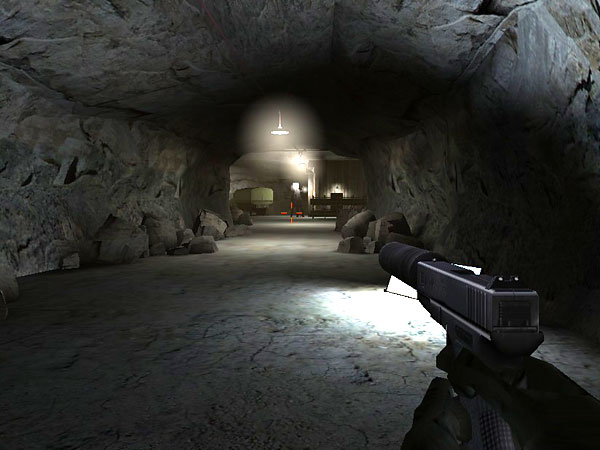
In this sequel to the award-winning Project IGI: I’m Going In, players assume the role of British covert operative David Jones, a former SAS soldier now working for the secret U.S. military organization codenamed ‘IGI’. Set directly after the events of the original game, Jones undertakes top-secret military operations by infiltrating airbases, harbors, and secret government installations located deep within enemy territories.
IGI 2 boasts an action-packed single player campaign, featuring enhanced AI, a diverse range of weapon types and a newly implemented save system. Additionally, IGI 2 will offer intense team based multiplayer action. With an immersive storyline spanning across China, Russia and Libya, IGI 2 delivers a thinking-gamer’s first-person shooter. Each action packed mission expands the plot and is driven forward with impressive animated cut scenes that continue to absorb the player in the game’s carefully constructed narrative.


png

(i) Minimum Requirements

Windows 98/ME/2000/XP/Vista/7
DirectX 8.1
Pentium III or Athlon at 700Mhz
128Mb RAM
Supported 32Mb Graphics Card
DirectX 8.1 Compatible Sound Card
8x CD-ROM
1.9Gb Hard Disk Space
(1.4Gb for game, 500Mb free after installation)


(ii) Recommended Requirements

Windows 98/ME/2000/XP/Vista/7
DirectX 8.1
Pentium 3/4 or Athlon at 1.2Ghz
512Mb RAM
Supported 64Mb Graphics Card
DirectX 8.1 Compatible Sound Card
32x CD-ROM
1.9Gb Hard Disk Space
(1.4Gb for game, 500Mb free after installation)


png

jpg
jpg
jpg


Install Notes :-

1. unrar app
2. click on setup.exe file
3. after click on setup.bat file
4. it will take 20 to 30 minute
5. so wait
6. after done open C:\IGI 2 - Covert Strike\pc
7. and click on igi2.exe file

enjoy!!!

kaspersky all version keys Pack latest

This Kaspersky Key Pack contain-

1. Kaspersky Anti-Virus(KAV) 2013 and 2012 Activation Key File (100 Key Files)
2. Kaspersky Internet Security(KIS) 2013 and 2012 Activation Key File (118 Key Files)
3. Kaspersky Workstation/Server Edition Activation Key File (26 Key Files)
4. How To Activate Kaspersky 2013 And Kaspersky 2012
5. More! PURE Key and Instructions, Chinese Kaspersky key.
==================================================
Please try each key until you find the working one
==================================================


To activate your kaspersky 2012 With Keyfiles-

1. Download and Install Kaspersky 2012

2. Turn off/Unplug/Disconnect your internet connection

3. Click "Manage License" From Right Bottom of Kaspersky, Then click "Activate the application"

4. Enter key: AAAAA-AAAAA-AAAAA-AAAA3

5. Click on Next

6. In the next window, click on Browse

7. Specify the path to any key (file) from the Keys folder

8. Click on Next

9. After activation switch on the internet

10. Update virus definitions once/twice in a week to avoid key block

==================================================

To activate your kaspersky 2011 With Keyfiles-
==================================================

1. Open Kaspersky 2011 License Manager (from lower right corner).

2. Click ‘Activate the application with a new license’ button. (Delete any trial key first, by clicking the red X next to the key).

3. Select ‘Activate commercial version’ and enter the activation license code as 11111-11111-11111-1111X

4. Wait activation wizard message->Click OK

5. Wait for wrong activation code message->Click OK->

6. Screen will appear with KEY FILE BROWSE

7. Browse to the key location and activate kaspersky.

==================================================
Activate Kaspersky 2011 by Command Line Method
http://www.youtube.com/watch?v=KfWOQu1lL54
==================================================


==================================================
To Activate Kaspersky 2011 license using key file:
==================================================

1. Open Kaspersky 2011 License Manager (from lower right corner).
2. Click ‘Activate the application with a new license’ button. (Delete any trial key first, by clicking the red X next to the key).
3. Disable your internet connection (either disable Network adapter from control panel or turn off your modem/router).
4. Select ‘Activate commercial version’ and enter the activation license code as T1JVS-NNMBD-K1QTN-SUBP8
or select ‘Activate trial license’.
5. Click Next, an error dialog box will open as shown below:
6. Click Ok and you will now get the option to activate kaspersky using a key file.
7. Browse to the key location and activate kaspersky.


==================================================
To activate your kaspersky 2010 with key file-
==================================================

1. Disable/Unplug your internet connection.
2. Click for trial version or enter one of this invalid codes-

STQRT-2G35E-YQH5G-QUA8H
GT5VQ-JX3MF-5SEFR-PX56F
5DS6N-FTMZV-HXUDK-H1XAR
51MNK-G3KW3-KHCZZ-8CN2M
HMSJA-5MX27-FM3VB-3252E
BBH1J-BMH1Z-JUWAD-52Y1V
H75P6-843Q4-N99RQ-7TRKG
K7BXW-1BHGB-AVKHG-F162Q
J398A-DR1YN-AG7KC-F2Q5J
GT5VQ-JX3MF-5SEFR-PX56F
KJEGM-C7274-1G5SN-TSAP3
HXGN1-YBCXH-J3KW9-K589V
KK9WC-GGMC7-XCYVF-1R8XU
H7FUH-KM6TN-S5UTX-93QBS
JTCSR-3X2RX-KVRBC-N462M
H979W-ANDMZ-N4W1K-Z3RS4
7C72Z-GYXM2-G2D95-RY8CV
HCW7U-C34VH-ETTWU-YPUGD
FNQT5-1YD9E-MJYY8-WXEX8
KK98K-HHXWG-C3JG6-6ZZYR
HYRPZ-38W2X-MB5DH-KF421
J5CPD-63M7R-KBR9E-H6YHB
B4862-EGQ3Q-J3GNU-EDECD
J5Z1H-NHR8J-9HZFA-DJ5FT
3TZV1-Z5F9W-DXBWX-Q1KDA

3. Kaspersky will show you an error.
4. A new window will appear with key file browsing option.
5. Select your key from browsing window.

Folder Lock 7.1.8 Final + Serial Key


Folder Lock 7.1.8 comes with a perfect combination of seven (7.1. security tools, letting you encrypt your important files using 256-bit on-the-fly encryption; back them up in real-time to an online storage, and store them to any portable device. The program also lets you lock files, folders and drives; save your personal information in Wallets; shred files and clean your Windows History.

Features of Folder Lock 7.1.8
===============================
1. Users have an option Whether to Encrypt or Lock, choices useful for both power users and casual users. Those who want ultimate security, can choose encrypiton. those who want ultimate speed, can choose locking.

2. There's no longer the hassle of encrypting each and every file on different locations. Think how much time you will save simply by putting all your files and folders in one location. Convenient encryption and decryption happens on-the-fly.

3. Both Encryption and Locking are exceptionally fast. No competitor is offering this speed while offering 100% secure 256-bit AES Encryption.

4. The Lockers can not be deleted on the computer where Folder Lock is installed and Folder Lock can t be uninstalled without the correct password.

5. Users who want to password protect folders on multiple locations on their hard disk, not just on the C: drive, can Easily protect their files on another partition by copying the Lockers from one place to another or by simply using the Lock feature.

6. Secure and very strong Encryption. A strong industry standard 256-bit AES Encryption is used to encrypt your files for maximum protection. It is one of the most trusted encryption algorithms used in United States Military.

7. Folder Lock offers fully portability and it can even protect CD / DVD-RW, not just USB Flash Drive, Memory Stick and floppy disks. To protect data on these drives, you can simply copy or burn your Locker to that drive.

8. Lockers can also be emailed to someone over the internet. They won t be Able to see your encrypted files without your password / permission. Even if someone breaks through and checks your email attachment in between, he won t be Able to decrypt or use this information without the correct password.

9. Folder Lock works flawlessly on all Next Technology Windows, ie Windows Vista / 2003 / XP / 2000 / NT. It is also fully compatible on all disk drives types Including FAT16, FAT32, NTFS and EFS.

10.You can increase of the size of your Locker by simply adding more files and folders into your Locker. Even if you are left with little space in your Locker, you can always increase of its size.

11.Brute force cracking is not possible, since the program delays for some time once a password is entered. This will Prevent hackers who may try many different combinations of passwords to get through your files. The program also produces a load beep when an incorrect password is entered, to alert the administrator of possible hack attempt.

12.Password Strength meter shows you the strength of the password as you type, while you re setting a new password. Basic rule of thumb is to use a password that is easy to remember but hard one to guess.

13.Folder Lock doesn t save the password in the registry or the disk, Preventing hackers and crackers.
14.Folder Lock also offers Auto Protect and Auto Shutdown features, this setting automatically locks or shutdown if more than five incorrect passwords are entered to try to decrypt the files.

15.Folder Lock erases tracks of users when they click the lock button. It deletes recent document history, find file and folder history and the data in the clipboard when you close the Locker.

16.Protects important files from viruses, hackers, crackers, trojans, malware, spyware, worms, malicious programs and scripts. Protects files from network computers if you do not want to share files on the network. Also Protects files from hacker tools when you connect to the internet.

17.While using the Lock feature, users can choose to lock and hide their files simultaneously. Locked and Hidden files are unrenameble, undeletable, unmovable and totally inaccessible. There is no limit to the size of the data or the type of files you can protect.

18.With its reduced file size and compact design, Folder Lock takes only 3.5 MB of hard disk space.small, portable and easy to keep. Thanks to the latest compression techniques. The GUI and interface is so well designed, it looks like an integral part of Windows XP.

19.Folder Lock isn t required to run at all times. Moreover, it doesn t save anything to the registry / run so that users do not have any memory problems or stability problems with the program.

Requirements: Windows (All Versions)
Languages: Multiple languages

~ Install Notes ~
Step 1: Run the setup
Step 2: Use the given serial key to activate

Enjoy...

Kaspersky Mobile Security.9.10.139

raQb81E.jpg


Current Version: 9.10.139
Requires Android: 2.2 and up
Category: Tools
v9.10.139 update:
· Android 4.2 support
· Mugshot for identification of unauthorized users of your smartphone by secretly taking their picture
· Anti-Theft Web Management portal – web-based control centre providing an easy-to-use, convenient way to interact with your phone remotely

Overview:
“KASPERSKY MOBILE SECURITY IS ONE OF THE BEST MALWARE PROTECTION SOLUTIONS” – AV-TEST.ORG*

Kaspersky Mobile Security delivers the latest security technologies to protect Android smartphones from viruses, Internet threats, phishing sites, spyware and spam. It includes easy-to-use, advanced privacy features and – if your phone is lost or stolen – you can remotely protect your data and find the location of your missing phone.

ANTIVIRUS PROTECTION AND MORE
• Automatic virus-scanning of apps
• Real-time, cloud-enabled protection – for rapid reaction to new and emerging threats
• On-demand and scheduled scans allow you to run antivirus scanning when it’s most convenient for you
• Over-the-air antivirus database updates – for minimal impact on performance
• Device Admin feature prevents unauthorised un-installation – so third-party apps and other users cannot access the Kaspersky Mobile Security application, without the secret code

WEB PROTECTION
• Blocks dangerous or malicious websites
• Alerts you about fraudulent or phishing websites that may try to steal your money or your identity

ANTI-THEFT PROTECTION
• Remotely block access to your Android smartphone if it’s lost or stolen
• Remotely ‘wipe’ your phone – to delete your personal information
• Find your missing phone’s location – with GPS, Wi-Fi and Google Maps
• Block, clean or locate your missing phone – even if your SIM card has been replaced

CALL & SMS FILTERING
• Receive only the calls and texts that you want to receive
• Block unwanted calls and texts from unknown numbers

PRIVACY PROTECTION
• Control what others can see and access – whenever they pick up your phone
• Hide designated contacts, calls, SMS texts and logs – by just pressing a button

SUPPORTED LANGUAGES:
English, French, German, Russian , Portuguese, Finnish, Italian, Swedish, Danish, Dutch, Norwegian

SYSTEM REQUIREMENTS:
• Android 2.2 – 4.2
• Minimum screen resolution – 320×480

TROUBLESHOOTING:
I am unable to validate Kaspersky Mobile Security app. What should I do?

On some devices, Google Play issues can result in an app failing to validate – even though the app has been paid for.If this happens, please do the following:
1. On the device, select Applications > Settings > Applications > Manage applications.
2. Select Google Play Store.
3. On the app information screen, select Clear cache – then select Clear data.
4. Restart Google Play.
5. Start Kaspersky Mobile Security and re-validate the app.

TOOLBAR

Alexa Rank

Link List

Send Free SMS